Mostrando entradas con la etiqueta Halloween. Mostrar todas las entradas

miércoles, 26 de septiembre de 2018

Freebie Happy Haunting - The Fantastically Free Blog Train Group


Hello, this is my first post since 2016, time flies! I'll try to update the blog with freebies more often. 
I joined The Fantastically Free Blog Train Group and I have a brand new halloween freebie kit to share ♥
You can click in the preview or  HERE


And check the rest the train here: 

domingo, 30 de octubre de 2016

Freebie Pumpkins & Witches - Bibi's Collection Annual Blog Train

Hello, this is my first post in years. I have a cute halloween freebie for you :)


You can click in the preview or  HERE


And check the rest the train here: https://madmimi.com/p/c551f8


Thanks for stopping by & Happy Halloween!
Hugs, Gaby

domingo, 20 de octubre de 2013

Freebie: BOOtiful Night - Blog Train Freebie


Here's my part of the awesome blog train called: BOOtiful Night


The kit is a halloween cutie and contains: 36 unique elements and 6 papers
I hope you like it!!


Download from here: OPTION1 or OPTION2
(same file, only uploaded in different accounts)
Please don't forget to visit here:
To get more freebies :)
Hugs ♥ ♥

jueves, 11 de octubre de 2012

BOOOlicious


Supplies Needed:
Psp
Tube of choice. Art by Amber Chen.
Scrap kit (PTU) Toxic Brew by Inzpired Creations here
Template KDHal3 by Dee'Sign Depot and Kandi Kissez here
Eye candy 5 Impact
Font here


Open the template. Dupliacate and close the original file.
Delete the layer:
Raster 1
dotted rectangle
Arrows

Activate the layer: Slats.
Colorize to match your tube.

Activate the layer: bottom orange circle.
Selections - All - Float - Defloat. Delete the original layer.
Open paper: 12. c/p in the canvas, Resize at 55 percent - Smart Size.
Selections - Invert. Edit Clear. Deselect.

Repeats for the layer: top orange circle.

Activate the layer: black rectangle.
Selections - All - Float - Defloat. Delete the original layer.
Open paper: 1. c/p in the canvas, Resize at 70 percent - Smart Size.
Selections - Invert. Edit Clear. Deselect.

Activate the layer: purple rectangle.
Selections - All - Float - Defloat. Delete the original layer.
Open paper: 13. c/p in the canvas,
Selections - Invert. Edit Clear. Deselect.

Activate the layer: left black square.
Selections - All - Float - Defloat. Delete the original layer.
Open paper: 4. c/p in the canvas, Resize at 50 percent - Smart Size.
Selections - Invert. Edit Clear. Deselect.

Repeats for the layer: right black square.

Activate the layer: frame bg.
Selections - All - Float - Defloat. Delete the original layer.
Open paper: 2. c/p in the canvas, Resize at 40 percent - Smart Size.
Selections - Invert. Edit Clear. Deselect.

Activate the layer: black frame.
Blur - Radial Blur:

Activate the layer: orange frame.
Selections - All - Float - Defloat. Delete the original layer.
Open paper: 7. c/p in the canvas, colorize to match the tube.
Selections - Invert. Edit Clear. Selections - Invert.

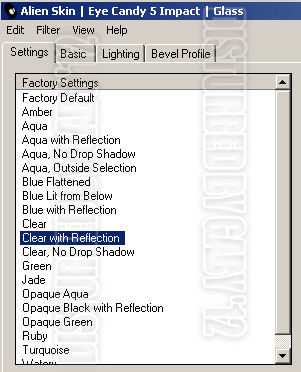
Add a new layer. Effects - Plugins - Eye Candy 5 Impact - Glass:

Colorize black and white.
Deselect.

Activate the layer: word art back.
Adjust - Add Noise:
Uniform
85 percent
Monochrome

Activate the layer: word art
Selections - All - Float - Defloat. 
Open paper: 11. c/p in the canvas, Resize at 30 percent - Smart Size.
Selections - Invert. Edit Clear. Deselect.

Grab the freehand selection tool:
Low the opacity of the layer and  make a selection around the word: licious

Edit -  Clear. Deselect.


Open the tube. c/p in the canvas, resize if needed. Place it in the centerr.
Duplicate, apply gaussian blur: radius by: 3 pixels.
In the layer palette, change the blend mode to: Soft Light. merge down.
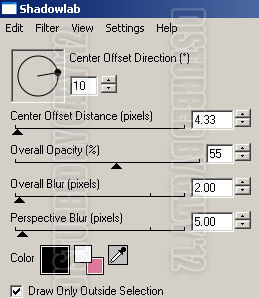
Effects - Plugins - Eyecandy 4000 - Shadowlab:

Open: web. c/p in the canvas, Resize at 70 percent - Smart Size.
Place it above the slats in the top left corner.

Open: Mirror. c/p in the canvas, Resize at 40 percent - Smart Size.
Place it above the web, in the top left corner.

Open: Scattered Leaves. c/p in the canvas, Resize at 70 percent - Smart Size.
Place it above the slats in bottom right corner.

Open: Book 1. c/p in the canvas, Resize at 70 percent - Smart Size.
Place it in the left side of the tag.

Open: Coffin 1. c/p in the canvas, Resize at 55 percent - Smart Size.
Place it next to the book.

Open: books 2. c/p in the canvas, Resize at 30 percent - Smart Size.
Place it up the coffin.

Open: Pumpkin. c/p in the canvas, Resize at 25 percent - Smart Size.
Place it above the coffin.

Open: Moon 2. c/p in the canvas, Resize at 50 percent - Smart Size.
Place it above the frame background.

Open: Fence. c/p in the canvas, Resize at 85 percent - Smart Size.
Place it above the glass frame.

Open: Grass 1. c/p in the canvas, Resize at 50 percent - Smart Size.
Place it in the right side of the fence. Duplicate. Image - Mirror.

Open: Wordart Framed. c/p in the canvas, Resize at 30 percent - Smart Size.
Place it below the tube layer.

Open: Bat 1. c/p in the canvas, Resize at 40 percent - Smart Size.
Place it in the top right of the tag.

Apply shadow to the template parts.
Effects - Plugins - Eyecandy 4000 - Shadowlab:

Sharpen the elements and apply shadow.
Effects - Plugins - Eyecandy 4000 - Shadowlab:


Add copyright and your name. Merge Visible, copy and paste as new image. Export as a png or jpg.

miércoles, 29 de agosto de 2012

Tag:Tony T + Extras

Tag created with this sexy tube by Tony T here. Another way to make a halloween tag ;) I hope you all like it!
I've made a set extras here


lunes, 31 de octubre de 2011

Kawaii Devil


Supplies Needed: 
PSP 
Tube of choice. I am using one by Lady Mishka, you can purchase the tube: here
Scrap kit Boo Halloween (FTU) by: Bibi here
Mask by Tonya from: Creative Misfits here
Font here

Open a new image: 600x600
Floodfill with white.
Open: Candy roll. Copy - Paste, as a new layer. Resize at 50 - Smart Size.
Go to: Effects - Plugins - Mura's Meister - Copies:


Select your ellipse tool. Foreground color: none. Background color: any. Create as a vector.
make an ellipse like this:

If you're happy with the size convert to raster layer. 
Selections - Select All - Float - Defloat.
Open the paper Boo Paper (3), Copy - Paste, as a new layer. 
Selections -Invert. Edit - Clear.  Now you can eliminate the shape but don't deselect.
Selections -Invert. 
Open the closeup of the tube. Copy - Paste, as a new layer. Selections -Invert. 
Modify - Expand: 5. Edit - Clear and deselect. 
Change the blend mode to: Luminance (Legacy) and low the opacity to: 50

Open: Glitter grey. Copy - Paste, as a new layer. 
Layers - Load mask: HalloweenGlowingPumpkinsMaskbyTonya - Merge group. 
Send the layer to the bottom, above the white background.

Open, Copy - Paste, as a new layer and resize these elements from the kit:
Rainbow lights
Coco1
Coco5
cake
Boton Boo Halloween
candy-2
candy-3
pendente heart black
Ribbon
Spider
vampirin

Apply Sharpen to the elements and Drop shadow:
V: 0 H: 2
O: 55 B: 3

I've used these elements above the mask layer:
Chakira splash
splash and stars green


Open - Copy - Paste your tube as new layer. Resize if need it. 
Move it to the left side of your tag.
Apply Drop shadow:
V: -1 H: 4
O: 40 B: 7

Add your name and copyright. If you want a non animate tag, save now as jpg or png.
To animate:

Activate the close up layer
Effects - Artistic Effects - Glowing Edges:
Intensity: 2
Sharpness: 25

Edit - Copy Merged. 
Open Animation Shop. Paste as a new animation. Back to psp. 
Edit - Undo. Apply Glowing Edges again but change the: Intensity to: 1.
Copy merged and Paste after current frame. Repeat the steps changing the 
Intensity to: 4, 5 and 3. 
In Animation Shop you should have 5 frames.  Edit - Select all. 
Animation - Frame Propieties: change to 21.

 Play animation.
If you like it save as gif.
You're done!