sábado, 21 de julio de 2012

Rainbow Sky


Supplies Needed:
Psp
Tube of choice. Art by SkyScraps. Purchase it: here
Scrap kit Rainbow Sky (PTU) by Bibis Collection here
Forum set template 010 by me: PSP here PSD here **new link here
Plugin Eyecandy 4000
Font here


Open the banner template. Duplicate and close the original file.

Activate the layer: Background. With the magic wand, click inside.
Open the paper: RAINBOWSKY PAPERS (1). c/p in the canvas, select the part you like. 
Selections - Invert. Edit - Clear. Deselect.

Activate the layer: bars. Change the color to match your tube and apply:
Effects - 3D effects - Inner Bevel:

Add drop shadow:
V: 0 H: 0
O: 70 B: 10

Activate the layer: Wordart. Change the color or gradient if it's needed.
Add drop shadow:
V: 0 H: 2
O: 45 B: 0

Twice or add glow.

Activate the layer: stars around. The color is not important.

Effects - Plugins - Eyecandy 4000 - Glass:


Applied one time:

Applied twice:

Apply twice to make the center of some stars stand out.

Effects - Plugins - Eyecandy 4000 - Gradient Glow:


Activate the layer: star back. Change the color if it's needed.
Add drop shadow:
V: -1 H: 3
O: 40 B: 5

Activate the layer: main star. Change the color.
Effects - Texture effects - Blinds:

Open the tube. c/p in the canvas, resize if needed. Place it in the left of the banner.
Duplicate, apply gaussian blur: radius by: 2 pixels.
In the layer palette, change the blend mode to: overlay. 
Select the original tube layer and 
Add drop shadow:
V: 1 H: 3
O: 50 B: 4

Open: RAINBOW SKY ELEMENTS (89). c/p in the canvas. Move the layer above the paper.
Place it behind the stars.

Open: RAINBOW SKY ELEMENTS (20). c/p in the canvas.
Place it behind the tube, in the left side.

Open: RAINBOW SKY ELEMENTS (95). c/p in the canvas, resize. Image - Flip.
Image - Free Rotate: Right - 15 degrees.

Place it above the tube at the bottom, duplicate and move it a little to the right.

Open: RAINBOW SKY ELEMENTS (5). c/p in the canvas, resize. Place it at the top of the banner, below the frame.
Duplicate, image - flip and arrange it.

Open: RAINBOW SKY ELEMENTS (26). c/p in the canvas, resize. Image - Flip. 
Move it to the bottom, below the frame layer.

Add more elements the tag:
RAINBOW SKY ELEMENTS (46)
RAINBOW SKY ELEMENTS (50)
RAINBOW SKY ELEMENTS (56)
RAINBOW SKY ELEMENTS (59)
RAINBOW SKY ELEMENTS (65)
RAINBOW SKY ELEMENTS (79)

Always: Resize, sharpen and place as desire. 
Add drop shadow:
V: 1 H: 2
O: 45 B: 4

Add copyright and your name. Change the frame if you want.
Copy the layer: stars around. 
Start to merge the layer from the background until the layer: stars around , rename it: 1. 
Close it and merge all the layers above: star back. Rename it: 2

To animate:

Open Animation Shop. Paste as a new animation the stars.
Effects - Insert Image Effect - Rotate Colors:

YOu have 16 frames.
Back to psp, copy the layer:  1 from your banner. 
In animation shop, paste as a new animation,duplicate until you have 16 frames
Duplicate until you have 16 frames. Activate the first frame and select all.
Activate the stars animation, Select all the frames and drag it to your first animation. Place it above the ones merged with
the background. 

Back to psp, copy the layer: 2. To animation shop.
Paste as a new animation, duplicate until you have 16 frames.
Activate the first frame and select all. Carefully drag it into the first frame of the main animation.
Play the animation, change the speed to: 15. If you like save and you're done.

jueves, 19 de julio de 2012

Vixen Beauty


Supplies Needed:
Psp
Tube of choice. Art by SkyScraps, pruchase it here
Scrap kit (PTU) Emo Princess II  by Bibis Collection: here
Mask 21 by Gems here
Xero - Radiance here
Font here

Open a new image: 650x650

Open: BIBI EP ELEMENTS (11). c/p in the canvas. Resize at 50 percent (smart size)
Duplicate 2 more times and place them like this:
Merge visible.

With the magic wand, click inside of the first and last frame. 
Selections - Modify - Expand: 5 pixels.

Open: BIBI EP PAPERS (4). c/p in the canvas. Resize at 50 percent (smart size)
Selections - Invert. Edit - Clear. 
selections - Invert, again. Move the layer below the frame.
Open: the close up of the tube, c/p in the frames, Remove the excess and desect.
Change the blend mode of the left frame to: Overlay
Right frame, blend mofe of the layer: Screen.

Effects - Plugins - Xero - Radiance:

Now click inside of the center frame.
Selections - Modify - Expand: 5 pixels.
Open: BIBI EP PAPERS (1).png c/p in the canvas. Selections - Invert. Edit - Clear. Deselect.

open the paper: BIBI EP PAPERS (1).jpg c/p in the canvas.
Layers - Load/Save Mask - load mask from disk - Gemsmask21 
Send this layer to the bottom.

Open the main tube, c/p in the canvas, resize if needed. Place it in the center.
Add drop shadow:
V: -1 H: 4
O: 45 B: 6

Add more elements to decorate the tag:
BIBI EP ELEMENTS (3)
BIBI EP ELEMENTS (9)
BIBI EP ELEMENTS (13)
BIBI EP ELEMENTS (17)
BIBI EP ELEMENTS (25)
BIBI EP ELEMENTS (28)
BIBI EP ELEMENTS (30)
BIBI EP ELEMENTS (33)
BIBI EP ELEMENTS (50)
BIBI EP ELEMENTS (52)
BIBI EP ELEMENTS (66)

Always: Resize, sharpen and place as desire. 
Add drop shadow:
V: 0 H: 3
O: 40 B: 3
Add copyright and your name. Merge Visible, copy and paste as new image. Export as a png or jpg.

martes, 17 de julio de 2012

Pink Fetish


Supplies Needed:
Psp
Tube of choice. Art by Verymany for SATC. Purchase it: here
Scrap kit Fetish (PTU) by Inzpired Creationz here
Animation 85 made by Simone here 
Plugin Eyecandy 4000
Font here

Open a new image: 600x200.
open paper: 2. c/p in the canvas, place it like this:

Remove the excess from the canvas.

Open: barb wire. c/p in the canvas, resize at 50 percent (smart size)
place it at the top border:

Duplicate, merge down this layers.
Duplicate the merged barb wire. Image - Flip.

Open: Border 1. c/p in the canvas, place it at the left bottom of the banner.
Effects - Plugins - Eyecandy 4000 - Gradient Glow:


Open the tube. c/p in the canvas, resize if needed. Place it in the center of the banner.
Duplicate, apply gaussian blur: radius by: 3 pixels.
In the layer palette, change the blend mode to: Overlay. Low the opacity to: 65.
Select the original tube layer. 
Add drop shadow:
V: 1 H: 4
O: 60 B: 4

Open: Cuff, c/p in the canvas, resize and place it above the tube in the left side.
Open: Skull 1. c/p in the canvas, resize and place it above the cuff but to the right side.
Open: doodle 1. c/p in the canvas, resize and place it above the tube in the right border.
Duplicate. Image - Mirror.

Open: splatter 2. c/p in the canvas, resize at 50 percent (smart size).
Place it behind the border layer.

Add more elements the tag:
clutch
Condom 1
Condom 2
corset 2
flower 1
hat 1
heart 1
sparkles 2
stars 1
shoe 2 

wordart 1


Always: Resize, sharpen and place as desire. 
Add drop shadow:
V: 1 H: 3
O: 50 B: 7

Add copyright and your name.Merge visible. Copy.

To animate:

Open Animation Shop. Paste as a new animation. Duplicate until you have 23 frames.
Activate the first frame and select all.

Open: SimoneAni85-ValentineSpecial-005. Activate the first frame and select all. 
Carefully drag it into the first frame of the main animation. I placed mine in the opposite corners.
Play the animation. If you like save and you're done.

Kiss This


Supplies Needed:
Psp
Tube of choice. Art by Celine, pruchase it here
Scrap kit (PTU) Kiss my azz  by Bibis Collection: here
Mask 32 by Gems here
Font here


Open a new image: 650x500.
Open: KISS MY AZZ ELEMENTS (35). c/p in the canvas
Duplicate. Colorize to combine with a color from your tube.
Image - Flip. Arrange it if it's needed. Merge Visible.

With the magic wand click inside of the frame. 
Selections - Modify - Expand by: 5 pixels.
Open: KISS MY AZZ PAPER (1). c/p in the canvas, resize 50 percent (smart size)
Selections - Invert. Edit - Clear. Deselect. Move the layer below the frame.

Open: KISS MY AZZ PAPER (2). c/p in the canvas, Apply mask:
Layers - Load/Save Mask - load mask from disk - Gemsmask32 
Send this layer to the bottom.

Open the main tube, c/p in the canvas, resize if needed. Place it in the center.
Add drop shadow:
V: 0 H: 4
O: 55 B: 8

Open: KISS MY AZZ ELEMENTS (77).c/p in the canvas, resize at 50 percent (smart size).
Place it in the right side of the bottom corner.
Open: KISS MY AZZ ELEMENTS (78). c/p in the canvas, resize at 50 percent (smart size).
Place it at the bottom of the tube.
Open: KISS MY AZZ ELEMENTS (48).  c/p in the canvas, resize at 40 percent (smart size).
Image - Mirror. Place it above the netting.

Add more elements to decorate the tag:
KISS MY AZZ ELEMENTS (6)
KISS MY AZZ ELEMENTS (20)
KISS MY AZZ ELEMENTS (30)
KISS MY AZZ ELEMENTS (59)
KISS MY AZZ ELEMENTS (62)
KISS MY AZZ ELEMENTS (71)
KISS MY AZZ ELEMENTS (74)
KISS MY AZZ ELEMENTS (75)

Always: Resize, sharpen and place as desire. 
Add drop shadow:
V: 1 H: 3
O: 50 B: 4

Add copyright and your name. Merge Visible, copy and paste as new image. Export as a png or jpg.

lunes, 16 de julio de 2012

My pink birthday


Supplies Needed:
Psp
Tube of choice. Art by Celine, pruchase it here
Scrap kit (PTU) B!TCH by PinkCandyDesings: here
Template 63 by TracyF , available here (below: blog archive)
Font here

Open the template. Duplicate and close the original.
Delete the layer:
Tracy.F Designz
Resize at 95 percent (smart size).

I will start from the bottom layer:

Replace the layer: square with the paper: pp3. Remove the excess.
Replace the layer: rectangle with the paper: pp9. 
Effects - Texture Effects - Blinds:

Replace the layer: circle with the paper: pp4. 
With the magic wand:
click in the black spaces of the paper:

Adjust - Add/Remove Noise - Add Noise:
Gaussian
35 percent
Monochrome

Selections - All - Float - Defloat.
Open the close up of the tube, c/p in the canvas. Place it above this circle.
Selections - Invert. Edit - Clear. Deselect.
In the layer palette change the blend mode to: Luminance (L)

Replace the layer: heart 1 with the paper: pp1.
Open the close up of the tube, c/p in the canvas. Image - Mirror. Place it above the heart.
Selections - Invert. Edit - Clear. Deselect.
In the layer palette change the blend mode to: Overlay.

Replace the layer: heart 1 with the paper: pp6. 

Open: pillow. c/p in the canvas, resize and place it in the bottom corner.
Open: roses. c/p in the canvas, resize and place it above the pillow.
Open: cupcake. c/p in the canvas, resize and place it next to the pillow.
Open: cherries. c/p in the canvas, resize and place it next to the cupcake.

Open: bow. c/p in the canvas and place it between the hearts.
Open: netting, c/p in the canvas and place it behind the right top square

Open the tube, c/p in the left side. Place it and resize if is needed.
Add drop shadow:
V: 0 H: 4
O: 45 B: 6

Add more elements to decorate the tag:
bottle
button
candy
decor
heart2
keychain
pin
sparkles
tag

Always: Resize, sharpen and place as desire. 
Add drop shadow:
V: -1 H: 2
O: 40 B: 4

Add copyright and your name. Merge Visible, copy and paste as new image. Export as a png or jpg.

sábado, 14 de julio de 2012

Girly Girl


Supplies Needed: 
PSP 
Tube of choice. I am using one by SkyScraps. You can now find the tube: here
Pattern 001 by me here
Plugin: Dsb Flux here
Toadies here
Eyecandy 4000
Font here and here

Open a new image: 650x500
Open the tube, c/p in the canvas.
duplicate and activate the original tube layer.
Adjust - Blur - Gaussian Blur:
Radius: 5

Effects - Plugins - Toadies - Weaver:

Effects - Plugins - Dsb Flux - Blast:

Apply blast effect again, but change the direction to: Left
Apply Weaver, same settings used.

you can leave it like this or:
Activate the tube (without an effect) duplicate again, 
Adjust - Blur - Gaussian Blur:
Radius: 8

Adjust - Add/Remove Noise - Add Noise:
Uniform
Noise Percent: 80
Monochrome

Move the layer between the tube behind the tube.

Make the Wordart

Make a gradient with two colors that match your tube. my choice:
Foreground: #d40065
Background: #eb99f2

Angle: 0
Repeats: 2
Style: linear
Invert: uncheked

Write: GIRLY GIRL (all in caps) or anything you like.

Colors:
Foreground: none
Background: the gradient 

Convert as a raster layer. Place it behind the tube and at the bottom.
Selections - All. Float - Defloat.
Selections - Modify - Contract by: 3 pixels.

Effects - Plugins - Eyecandy 4000 - Glass:


Open the pattern I made, select it in the materials:

Add a new layer and flood fill with the patter.
In the layer palette change the blend mode to: soft light.
Deselect and merge down the layers. 

I'm going to add two differents drop shadow, you can skip the steps.
Duplicate the wordart. Select the original:
Add drop shadow:
V: 0 H: 3
O: 40 B: 5

Activate the duplicate layer. 
Effects - Plugins - Eyecandy 4000 - Shadowlab:
From the menu settings apply: short perspective shadow

but with this settings:
Remove the excess of the edges with the eraser tool. It's optional.
Add copyright and your name. Merge Visible, copy and paste as new image. Export as a png or jpg.

viernes, 13 de julio de 2012

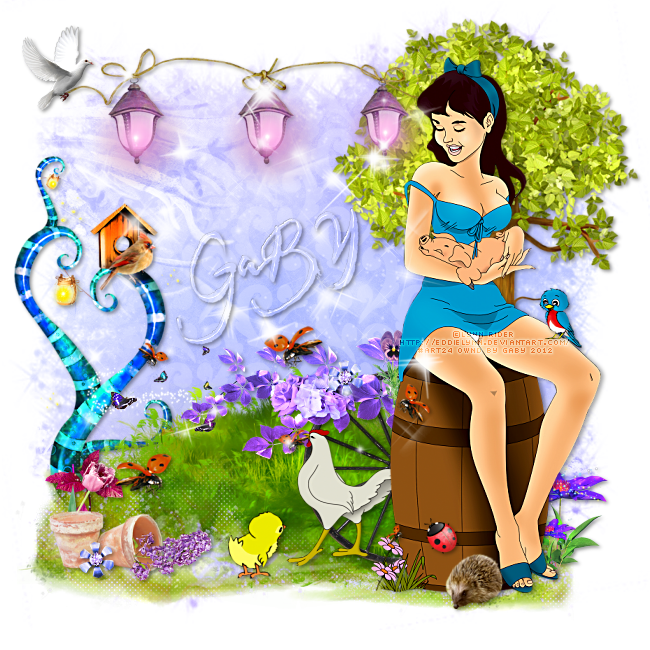
Farmer's daughter


Supplies Needed:
Psp
Tube of choice. I have used a tube by Lynn Rider, you can find the tube: here
Scrap kit (PTU) Illusions by Abstract Creations: here
Eyecandy 4000
Font here

Open a new image: 650x650.
Open paper: p3. c/p in the canvas. 
Apply the mask: gemsmask16. Merge group. Duplicate and merge down.

Open: e79. c/p in the canvas, resize 80 percent (smart size).
place it in the right side.
Open: e22. c/p in the canvas, place it at the bottom of the image.
Open: e20. c/p in the canvas, place it in front of the grass. 
Open: e86. c/p in the canvas, resize 80 percent (smart size). 
place it at the top next to the tree. 

Open: e9. c/p in the canvas, resize 70 percent (smart size). 
place it in the right side of the tag, behind the grass. 

Open the tube. c/p in the canvas, resize if needed. Place it in the right side of the tag.
Add drop shadow:
V: 1 H: 3
O: 35 B: 6

The tube comes with extra animals,I added some of  them in the tag :)
Add more elements the tag:
e21
e37
e42
e53
e64
e65
e66
e68
e73
e78
e84
e95
e97
e100

Always: Resize, sharpen and place as desire. 
Add drop shadow:
V: 2 H: 2
O: 40 B: 5

Add copyright and your name. Merge Visible, copy and paste as new image. Export as a png or jpg.